

Description
Download Caricature PhotoS – Caricature, Line Art, Photo to Line Drawing, Fine Line Drawing, Artistic Photo Editing
Overview
Caricature PhotoS is a mobile application designed to simplify the creation of fine line drawings from digital photographs. Its primary purpose is to transform high-resolution images into artistic line art with minimal user effort. This tool addresses the challenge of producing detailed, hand-drawn-style illustrations that typically require significant skill and time, making it accessible to users without formal artistic training. The app serves both casual users looking to enhance their photo albums and aspiring artists interested in experimenting with stylized visual content.
Target users include smartphone owners who value creative expression through digital tools, particularly those interested in minimalist or artistic photo editing. The app’s utility extends to individuals who wish to personalize digital content for social media, websites, or personal projects. While the developer, Caricature PhotoS, has not provided further details about its background or development history, the app’s long-standing presence—first released in 2008—suggests a niche but enduring relevance in the mobile productivity space.
Real-world applications include converting portraits into elegant line drawings for digital scrapbooks, using stylized images as website graphics, or sharing unique artistic interpretations of personal photos. In the broader app ecosystem, Caricature PhotoS fills a specialized role by offering a streamlined, focused tool for a specific creative task, standing out among general photo editors with its singular emphasis on line art generation.
Key Features & Functionality
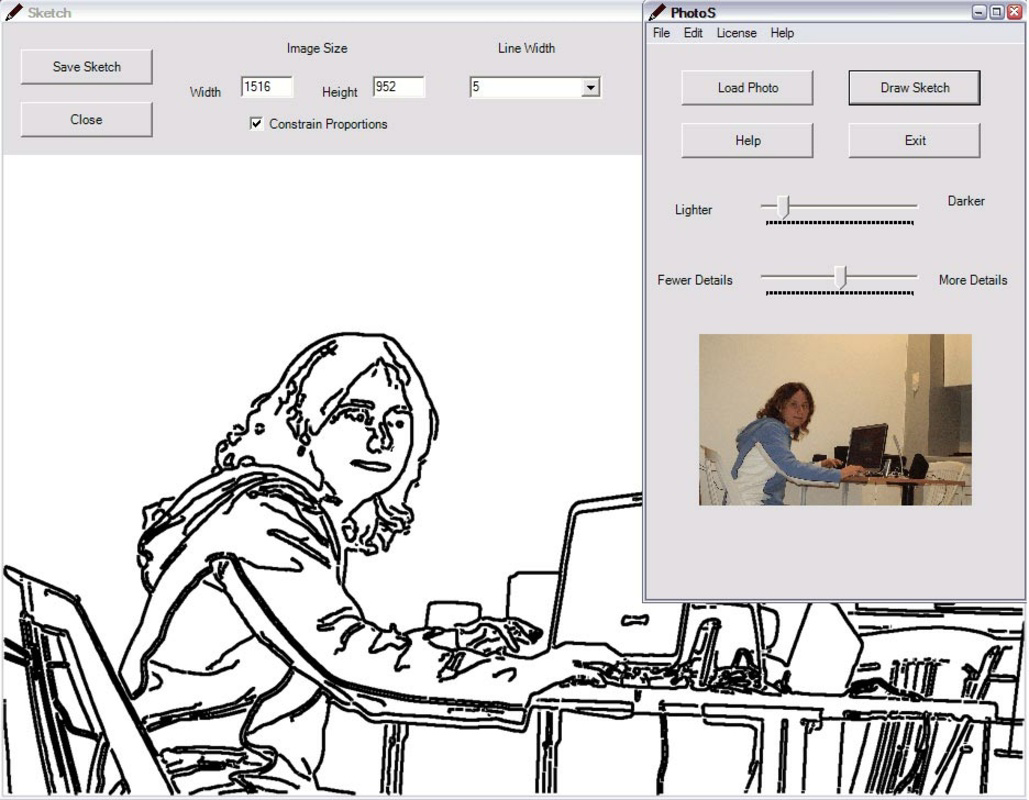
- One-Click Photo Conversion: Users can transform any high-resolution photo into a fine line drawing with a single tap, eliminating complex manual processes. This feature enables rapid artistic output, ideal for users seeking immediate results without technical barriers.
- Intuitive User Interface: The app’s design prioritizes ease of access, allowing users to select an image from their device’s gallery and initiate the conversion process with minimal navigation. This simplicity makes it suitable for individuals with no prior experience in digital art or editing.
- Enhanced Photo Album Presentation: By converting standard photographs into line art, users can add a distinctive visual style to their digital collections, offering a fresh way to revisit memories through artistic reinterpretation.
- Custom Content for Digital Platforms: The generated line drawings can be exported and used on websites, social media, or digital portfolios, providing a unique visual element that enhances branding or personal expression.
- Artistic Personalization: The ability to create personalized line drawings allows users to impress friends or share creative work without requiring drawing skills, promoting accessibility in digital art creation.
For example, a user could convert a family portrait into a minimalist line drawing to use as a desktop wallpaper or print as a keepsake. Similarly, a small business owner might use the app to generate stylized product images for their website, adding a distinctive visual identity.
Interface, UX & Performance
The user interface of Caricature PhotoS is designed around simplicity and direct functionality. The layout appears to center on a single, clear workflow: select an image, initiate conversion, and view or save the result. Navigation is likely linear and minimal, reducing cognitive load and ensuring that users can complete tasks without confusion.
Visual style emphasizes clarity and functionality over decorative elements, aligning with its productivity-focused category. The absence of cluttered menus or excessive animations supports a fast, responsive experience. Although the developer did not list formal performance metrics, the app’s lightweight size of 1.2 MB suggests optimized resource usage, which may contribute to smooth operation on a range of Android devices.
Responsiveness is expected to be consistent across entry-level and mid-range smartphones, given the app’s low file size and single-function focus. Stability is likely maintained through minimal code complexity, though real-world performance may vary depending on device hardware and Android version. The app does not appear to require constant internet connectivity, supporting offline use.
Platform Compatibility & Technical Requirements
Caricature PhotoS is available exclusively on the Android platform. The current software version is 1.0, indicating a stable but potentially legacy release. The app’s file size is 1.2 MB, which is relatively small and suggests efficient code structure and minimal resource demands.
Compatibility information was not fully disclosed. The developer did not specify minimum OS requirements or device specifications. As such, users should verify whether the app runs on their specific Android version. The absence of detailed technical requirements means that installation may depend on device-specific factors not publicly listed.
Despite the lack of formal compatibility details, the app’s lightweight nature increases the likelihood of broad accessibility across older Android devices. However, users are advised to check system requirements before installation, especially if using devices with outdated software.
Pros and Cons
Pros
- Simple, one-click conversion from photo to line art
- Minimal file size enables easy installation and low storage usage
- Accessible to users without artistic or technical experience
- Free to download and use with no in-app purchases
- Supports offline functionality for uninterrupted use
Cons
- No publicly available information on minimum OS or device requirements
- Limited customization options for line style or thickness
- No visible update history or recent development activity
- App version is 1.0, suggesting potential outdated design or functionality
- Developer did not provide additional technical details or support channels
FAQ
Is Caricature PhotoS safe to download and install?
Yes, the app is free and available through official Android channels. Its small size and lack of apparent permissions suggest a low-risk profile. However, users should ensure they download from trusted sources to maintain device security.
Can I use Caricature PhotoS without an internet connection?
Yes, the app functions offline. Since it processes images locally on the device, no internet access is required after installation.
Does the app support iOS devices?
Currently, Caricature PhotoS is only available on Android. There is no official iOS version or indication of future development.
How often is the app updated?
The developer has not published update logs or release notes. The current version is 1.0, which may indicate limited or no recent development activity.
Can I edit the line art after conversion?
The app’s interface does not include editing tools for modifying line thickness, style, or composition after conversion. All changes must be made before the process begins.
Final Thoughts
Caricature PhotoS delivers a focused, no-frills solution for transforming photographs into fine line drawings. Its simplicity and accessibility make it a valuable tool for casual users and hobbyists seeking creative expression without technical barriers. While the app lacks modern design elements and recent updates, its core functionality remains effective for its intended purpose.
For those who value artistic personalization and lightweight productivity tools, Caricature PhotoS offers a practical and free way to enhance digital content. Its minimal footprint and offline capability further strengthen its appeal in a world of increasingly complex apps.
Download Caricature PhotoS now
Guides & Tutorials for Caricature PhotoS
How to install Caricature PhotoS
- Click the Preview / Download button above.
- Once redirected, accept the terms and click Install.
- Wait for the Caricature PhotoS download to finish on your device.
How to use Caricature PhotoS
This software is primarily used for its core features described above. Open the app after installation to explore its capabilities.
User Reviews for Caricature PhotoS 0
No reviews found


